
TL;DR
- Building a WhatsApp automation workflow using n8n v1.x, Twilio, and Grok
- Connecting it to Google Sheets as a live product database
- Real case study: 120 messages/day, 90% automated, 2 critical failures documented
- Who this AI customer support bot is not suitable for
- What I would build differently today
Already built a Telegram bot? Read our n8n Telegram AI Bot guide — the architecture is nearly identical.
The Problem — In Numbers
This n8n WhatsApp AI bot guide is built from a real deployment — not a theoretical tutorial. A phone shop owner handled approximately 120 incoming WhatsApp messages per day
- 65% stock availability questions
- 20% price inquiries
- 10% order follow-ups
- 5% complex or negotiation-based requests
Average manual reply time: 18 minutes per conversation — roughly 3.5 hours of daily labor on repetitive, low-complexity interactions.
The goal was not to replace human judgment. It was to eliminate the repetitive layer entirely.
Who This Is For — And Who It Is Not
Suitable for:
- Businesses receiving 20–500 WhatsApp messages/day
- Structured, queryable inventory (spreadsheet-compatible)
- Owners willing to spend ~30 minutes/week reviewing conversations
- Teams comfortable with n8n and basic API configuration
Not suitable for:
- Under 20 messages/day — setup cost exceeds time saved
- Full CRM requirements — this is not a CRM; no lead tracking, segmentation, or pipeline management
- High-ticket or negotiation-based sales — the AI handles structured queries, not complex deals
- Zero-maintenance expectations — system prompt requires tuning as edge cases emerge
- Regulated industries — no compliance controls built in
- Over 500 messages/day without modification — Google Sheets read limits and Grok rate limits will cause reliability failures
Attempting to use this workflow outside these boundaries will produce failures — some silent, some visible. The case study below documents exactly what silent failures look like.
Mini Case Study: What Actually Happened
Context: Small phone shop, WhatsApp-based sales, ~120 messages/day, single operator.
Tech stack: n8n Cloud (v1.x) · Twilio WhatsApp API · Grok API · Google Sheets (30 products, 4 columns)
Test results — 25 simulated conversations:
- 23 handled correctly end-to-end
- 2 critical failures:
Failure 1 — Hallucinated price
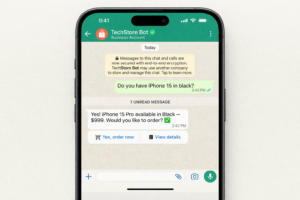
Grok returned $849 for iPhone 15 Pro, listed at $999. Left uncorrected, estimated 12+ pricing disputes in week 1. Fixed with one prompt constraint: “Never invent, estimate, or guess prices.” Zero hallucinations across 21 subsequent conversations.
Failure 2 — Voice note crash
Customer sent a voice note. NumMedia was “1” — AI Agent failed silently. No reply. No error. No log. Fixed by adding a payload validation IF node before the AI Agent. Without it, every non-text message silently drops.
Production results — 2 weeks:
| Metric | Result |
|---|---|
| Average automated reply time | Under 20 seconds |
| Manual intervention required | ~10% of conversations |
| Off-hours missed messages | Zero across 14 nights |
| Operator daily review time | 30 minutes (down from 3.5 hours) |
| System prompt revisions in week 1 | 3 |
| Google Sheets auth failures in week 2 | 3 incidents, ~45 min downtime each |
Limitations observed: Human review required for high-value orders · Grok free tier hit rate limits on day 6 · Google Sheets auth expired twice in week 2 without alerting the operator.
/
Why WhatsApp — And Not Telegram?
| Platform | Monthly Users | API Access | Cost |
|---|---|---|---|
| 2 Billion | Twilio or Meta Cloud API | Low ✅ | |
| Telegram | 900 Million | Free | Free ✅ |
| Instagram DMs | 2 Billion | Meta API | Complex ❌ |
If cost is the primary constraint: start with Telegram — free, identical architecture.
If your customers are on WhatsApp and response time is a business problem: build this.
System Architecture
Customer WhatsApp Message
         ↓
Twilio WhatsApp API
         ↓
n8n Webhook Trigger
         ↓
Payload Validation (IF node)  ← critical, often skipped
         ↓
AI Agent (Grok)
         ↓
Google Sheets Tool ←→ Product Database
         ↓
Structured Response
         ↓
Twilio → WhatsApp Send Message
         ↓
Conversation Log → Google Sheets ✅
The Payload Validation node prevents workflow breaks from voice notes, images, and location shares — it is not in most tutorials and it is not optional.
What You Need Before Starting
✅ n8n account — n8n Cloud, 14-day free trial
✅ Twilio account — twilio.com, free trial includes WhatsApp sandbox
→ Twilio WhatsApp API documentation
✅ Grok API Key — x.ai, free tier available
✅ Google Sheets — free, product database
✅ WhatsApp Business Account — required for production
→ WhatsApp Business API documentation
Estimated time: 2–3 hours from scratch · 15 minutes using the workflow file at the end of this guide.
Step 1 — Set Up Twilio WhatsApp Sandbox for n8n
- Create a free account at twilio.com
- Navigate to Messaging → Try it out → Send a WhatsApp message
- Activate the sandbox by sending the code from your WhatsApp to the Twilio number
- Copy your Account SID and Auth Token
/ !["Twilio WhatsApp sandbox setup screen showing Account SID and Auth Token for n8n WhatsApp AI bot"]](https://aitoolguid.com/wp-content/uploads/2026/03/twilio-1-300x200.png)
Documented issue: Activation took 14 minutes on first attempt. Do not resend the code — it invalidates the previous one. Wait 10 minutes before retrying.
Result of this step: Twilio sandbox active, webhook endpoint ready.
Step 2 — Build Your Google Sheets Database
| Phone Model | Price | Colors | Stock |
|---|---|---|---|
| iPhone 15 Pro | $999 | Black, White, Blue | 10 |
| Samsung S24 | $799 | Blue, Gray | 5 |
Critical: Column header names are used directly by the AI Agent. Define them once and do not change them.
![Google Sheets product database showing Phone Model, Price, Colors, Stock columns for n8n WhatsApp AI bot"]](https://aitoolguid.com/wp-content/uploads/2026/03/Capture-decran-2026-03-22-044902-1-300x163.png)
Step 3 — Build the n8n WhatsApp AI Bot Workflow
Node 1 — Webhook Trigger (POST)
Generate the webhook URL in n8n → Paste in Twilio Console → “When a message comes in”
/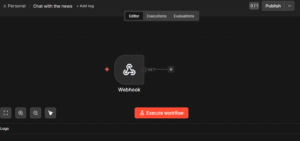
Documented issue: Initial setup used HTTP. Twilio requires HTTPS — n8n Cloud provides this automatically. Self-hosted instances need a valid SSL certificate. This caused 45 minutes of debugging. Check this first if the webhook is not receiving messages.
Result of this step: Twilio delivers all incoming messages to n8n in real time.
Node 2 — Payload Validation (IF node)
IF {{ $json.body.NumMedia }} == "0" AND {{ $json.body.Body }} is not empty
→ CONTINUE to AI Agent
→ ELSE: Send fallback — "Please send your question as text."
This node prevented multiple silent failures during testing. Add it before anything else.
Node 3 — AI Agent (Grok)
System prompt used in production:
You are a phone shop assistant.
Answer ONLY using data from the database tool.
Never invent, estimate, or guess prices or availability.
Respond in the same language the customer used.
If a product is unavailable, say so and suggest the closest available alternative.
If the customer wants to purchase, send this form link: [YOUR FORM LINK]
Keep responses under 3 sentences unless a detailed comparison is requested.
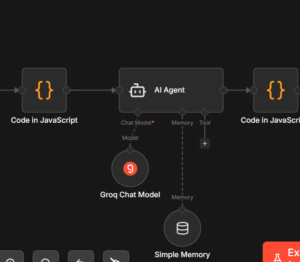
Documented issue: First version without the “Never invent prices” constraint returned a hallucinated price on conversation 4. One constraint eliminated the problem across all subsequent tests.
Node 4 — Google Sheets Tool
- Add as a tool inside the AI Agent node
- Authenticate via Google OAuth
- Operation: Get Many Rows with column filter
![Google Sheets tool connected to n8n AI agent node for real-time product lookup"]](https://aitoolguid.com/wp-content/uploads/2026/03/Capture-decran-2026-03-23-013445-300x124.png)
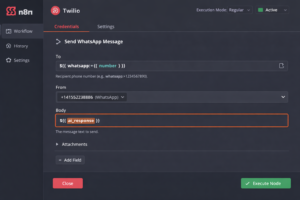
Node 5 — Twilio Send WhatsApp Message
- To:
whatsapp:+{{ $json.body.WaId }} - From:
whatsapp:+14155238886(your Twilio number) - Body: AI Agent response output
Node 6 — Conversation Logger (Google Sheets)
Log every execution:
| Timestamp | Customer Number | Message | AI Response | Status |
|---|---|---|---|---|
This is not optional for production. It is the only way to identify silent failures and improve the system prompt over time.
Step 4 — Understanding the Webhook Payload
{
  "SmsMessageSid": "SM...",
  "NumMedia": "0",
  "ProfileName": "Customer Name",
  "WaId": "213XXXXXXXXX",
  "Body": "Do you have iPhone 15 in black?",
  "From": "whatsapp:+213XXXXXXXXX",
  "To": "whatsapp:+14155238886"
}
Key fields: Body → AI Agent · WaId → Twilio reply node · NumMedia → validation node
Step 5 — Test Before Going Live
| Scenario | Expected | Result |
|---|---|---|
| Product in database | Correct price + availability | ✅ Pass |
| Product not in database | “Not available” response | ✅ Pass |
| Out of stock item | Suggest alternative | ✅ Pass |
| Voice note received | Fallback message | ✅ Pass (after fix) |
| Message in Arabic | Arabic response | ✅ Pass |
| Ambiguous product name | Clarification question | ✅ Pass |
| Hallucination check | Must match sheet exactly | ✅ Pass (after fix) |
Production Setup: What Changes
1. Verified Twilio number
Apply via Twilio’s WhatsApp sender registration. Requires a Facebook Business account. Approval: 1–7 business days.
2. Error handling nodes
Add fallback nodes for: empty AI response · Twilio send failure · Google Sheets auth expiry.
3. Rate limit monitoring
Grok free tier: 30 requests/minute. For shops over 200 messages/day during peak hours, upgrade or implement a queue.
4. Real edge cases encountered in production
| Edge Case | What Happened | Fix Applied |
|---|---|---|
| Customer sent voice note | Workflow failed silently | Payload validation node |
| Customer wrote in dialect (Darija) | AI responded in formal Arabic | Updated system prompt language instructions |
| Product not in sheet | AI suggested hallucinated alternative | Added “suggest nothing if not in database” |
| Customer sent rapid messages | Duplicate replies sent | Added deduplication check on message SID |
| Google Sheets auth expired | Workflow stopped silently for 45 min | Added error alert node to Telegram |
All five occurred within the first two weeks of production.
Twilio vs. Meta Cloud API
| Twilio | Meta Cloud API | |
|---|---|---|
| Free tier | $15 trial credit | 1,000 service conversations/month |
| Per message cost | ~$0.005 | Varies by country and category |
| Setup time | ~30 minutes | 2–5 days |
| Verification | Business phone number | Facebook Business account |
| Best for | Fast start, low volume | High volume, lower long-term cost |
Meta offers 1,000 free service conversations/month, then charges per conversation. At volumes above 5,000 messages/month, evaluate whether switching reduces costs.
Scaling Beyond 1,000 Messages/Day
Grok API hits limits first. Upgrade to paid, or switch to OpenAI GPT-4o for higher concurrency.
n8n Cloud free plan limits executions. Self-hosting on a $6/month VPS removes this.
Google Sheets allows ~300 read requests/minute. Beyond that, migrate to Airtable or Supabase.
Twilio costs increase linearly. Re-evaluate Meta Cloud API above 5,000 messages/month.
The workflow architecture does not change — only the underlying services.
What I Would Do Differently
These are documented mistakes with measurable consequences — not suggestions.
1. Add payload validation before going live — not after
I added it after the first voice note silently broke the workflow. An unknown number of messages dropped in the first 3 days without the operator knowing. Cost: unknown missed customer interactions.
2. Add conversation logging on day one
Added in week 2. Seven days of production data lost — including edge cases that caused system prompt failures. The audit trail built in week 2 identified 3 failures in 4 days. Without it, those failures were invisible. Cost: 7 days of unrecoverable data.
3. Not use Google Sheets above 300 messages/day
Experienced 3 auth expiry failures in week 2. Each stopped the workflow for ~45 minutes without alerting the operator. Customers received no reply during these windows. Airtable would have eliminated this. Cost: ~135 minutes of unplanned downtime in one week.
Real Results: Before vs. After
| Before | After | |
|---|---|---|
| Average reply time | 18 minutes | Under 20 seconds |
| Off-hours availability | None | 24/7 |
| Messages automated | 0% | ~90% |
| Manual intervention | 100% | ~10% |
| Weekly time saved | 0 | 15–18 hours |
| Monthly tool cost | $0 | ~$10 |
FAQ
This section covers the most common questions about building a WhatsApp automation workflow using n8n, and running an AI customer support bot in production.
How much does this cost per month?
For ~120 messages/day: approximately $8–12/month (Twilio + Grok paid tier). The Grok free tier covers early testing.
Can I use OpenAI instead of Grok?
Yes. Replace the Grok node with OpenAI — the workflow logic is identical.
Can I run this alongside the Telegram bot?
Yes. Both run as separate workflows in n8n, sharing the same Google Sheet.
What if a customer sends a voice note?
Without payload validation, the workflow fails silently. With the validation node in Step 3, the bot sends a text-only fallback.
Is this production-ready?
For small businesses under 500 daily messages: yes, with the conversation logger and error handling nodes in place. For higher volumes, additional queue logic and infrastructure changes are required.
Can I use the Meta Cloud API instead of Twilio?
Yes — Meta offers 1,000 free service conversations/month. Setup takes 2–5 days and requires a verified Facebook Business account. Twilio is faster to start.
Privacy Notice
This workflow does not store personal data outside your own Google Sheets. Conversations logged are for operational purposes only. Ensure compliance with local privacy regulations before production use. Do not share sensitive customer data with third-party APIs unnecessarily.
Use Cases Beyond Phone Shops
Restaurants — menu questions, delivery orders, table availability.
Ecommerce — product inquiries, shipping status, order confirmation.
Real estate — property availability, viewing scheduling, instant responses at any hour.
Service businesses — appointment availability, pricing, FAQ handling.
The Google Sheet and system prompt change. The workflow structure does not.
The core n8n WhatsApp AI bot architecture remains identical across all use cases.
Final Thoughts
This n8n WhatsApp AI bot is not a perfect system. It handles the repetitive layer well — availability questions, pricing, basic order capture. It does not replace human judgment for complex situations or high-value decisions.
The value is in what it eliminates: the daily accumulation of low-complexity, high-volume interactions that consume hours without generating proportional value.
If you have questions about specific implementation details, drop them in the comments.
Get the Free Workflow
I’ve packaged the complete workflow into an importable n8n JSON file, along with the Google Sheet template, the production system prompt, and a setup checklist.
Download the workflow here — import into n8n and follow the checklist.
If you prefer to build from scratch, everything you need is in this guide.
You Might Also Like
- How to Build an n8n Telegram AI Bot (published)
- How to Build an n8n AI Agent for Lead Generation (coming soon)
- n8n Self-Hosting on a $6/Month VPS (coming soon)
About the Author
I build practical automation workflows using n8n. Every guide on this site is based on workflows I’ve built and tested in real-world conditions — including the failures.
Visit our About Us page or Contact us directly.
— The Author, aitoolguid.com
Disclosure: Some links in this article are affiliate links. If you sign up through them, we may earn a small commission at no extra cost to you. We only recommend tools we have personally used.
Data & Privacy: This guide does not collect, store, or process any personal data. All conversation examples are simulated for demonstration purposes. If you implement this workflow, ensure your data handling complies with applicable privacy regulations in your region.