
TL;DR
This guide shows you how to:
.This n8n Telegram AI bot guide is built for real-world use — not just theory
- Build a Telegram AI bot using n8n and Grok
- Connect it to Google Sheets as a live product database
- Automate 90%+ of repetitive customer replies — instantly
- Deploy the full system in under 3 hours (or 15 minutes with the free workflow)
Delayed replies significantly reduce conversion rates in online commerce — and phone shops are one of the hardest-hit businesses, since most customer decisions happen in real time on messaging apps.
If you run an online phone shop — or know someone who does — this guide will directly address that problem.
In the next few minutes, you’ll learn how to build an n8n Telegram AI bot that handles customer messages automatically — checking your Google Sheets inventory, sending prices, and confirming orders while you sleep.
No coding. No expensive tools. Just AI and automation working for you 24/7.
Who Is This For?
- Phone shop owners drowning in repetitive Telegram messages
- n8n developers looking for a real-world automation use case
- Anyone who wants to understand how AI agents actually work in practice
The Problem I Stumbled Upon
One day, I was scrolling through Reddit when a post stopped me cold.
A phone shop owner was venting — and honestly, his frustration was completely valid.
Every single day, his Telegram was flooded with the same questions:
“Do you have this phone?”
“How much is the iPhone?”
“Is it available in blue?”
Sound familiar?
These questions pile up by the dozens every day. Answering them manually wastes 3-4 hours of precious time — and the moment you’re too slow to reply, that customer is already buying from your competitor.
Lost customers. Lost revenue. All because of unanswered messages.
I knew there had to be a smarter way.
So I challenged myself: could an n8n Telegram AI bot completely eliminate this problem?
Two days of focused work later — I had my answer.
Today, I’m sharing exactly how I built it — step by step, with real screenshots — so you can do the same, for free.
Why This Guide Is Different
This isn’t just another theoretical tutorial.
This is a full breakdown of the exact logic and thinking process that led me to solve this problem — documented with real screenshots and videos at every step.
By the time you reach the end, you won’t just be copying steps blindly.
You’ll actually understand what you’re building — and why it works.
That’s the difference between following a tutorial and truly knowing how to build something yourself.
If you’d rather skip the setup and import everything in 2 minutes, download the complete workflow file here.
Real-World Deployment: A Mini Case Study
Before we get into the build — here’s what this workflow actually looks like in production.
I deployed this for a small phone shop that was handling roughly 120 customer messages per day on Telegram.
The results after the first week:
- Manual reply time dropped from 3 hours daily to under 20 minutes of review
- Zero missed messages during off-hours
- Order confirmation rate improved — customers got instant responses instead of waiting
This wasn’t a perfect, controlled lab test. The shop owner still reviewed conversations daily. But the workflow handled the repetitive layer completely — freeing up his time for what actually mattered.
That’s the realistic outcome you should expect: not full replacement of human judgment, but a significant reduction in manual workload.
Why Telegram — And Not SMS or Instagram?
Good question. Here’s the honest answer.
When I was building this, I considered several messaging platforms:
| Platform | Cost | API Access | Setup Complexity |
|---|---|---|---|
| Telegram | Free | Full & free | Simple ✅ |
| Paid Business API | Restricted | Complex ❌ | |
| Instagram DMs | Meta API required | Limited | Complex ❌ |
| SMS | Per-message cost | Twilio/etc. | Moderate ❌ |
Telegram won on every front.
Its Bot API is completely free, well-documented, and integrates natively with n8n. For a phone shop serving customers on mobile, Telegram is already where most of them are — especially in markets across the Middle East, North Africa, and Southeast Asia.
That’s why this workflow is built on Telegram. Not because it’s the only option — but because it’s the smartest starting point.
AI Agent vs. Traditional Rule-Based Bot
Before we build — let’s be clear about what makes this approach different.
| Rule-Based Bot | AI Agent (This Workflow) | |
|---|---|---|
| How it works | Predefined flows | Dynamic, context-aware responses |
| Handles variations | Breaks easily | Handles natural language |
| Scalability | Hard to maintain | Scales with your data |
| Setup complexity | High (lots of rules) | Low (one good prompt) |
| When it fails | Often, on edge cases | Rarely, and gracefully |
A rule-based bot breaks the moment a customer types something unexpected.
An AI Agent reads the intent — not just the exact words — and responds accordingly.
That’s the core difference. And that’s why this approach works at scale.
What You Need Before Starting
Before we dive in, here’s everything you need — and yes, most of it is completely free.
Tools Required
✅ n8n account
→ Use n8n Cloud (14-day free trial)
→ Perfect for beginners — no server needed
✅ Telegram Bot Token
→ Create one for free via @BotFather
→ Takes less than 2 minutes
→ Full guide in the Telegram Bot API docs
✅ Grok API Key (free tier available)
→ More generous free tier than OpenAI
→ This is the AI brain of our agent
✅ Google Sheets (completely free)
→ This is your product database
→ No coding — just a simple spreadsheet
Skills Required
✅ Basic familiarity with n8n
→ Never used n8n? No problem — I’ll walk you through every step.
✅ No coding required
✅ No server setup needed
✅ No paid subscriptions to get started
Estimated Time
⏱️ 2-3 hours building from scratch
⏱️ 15 minutes using my free workflow file
System Architecture: How It All Connects
Before touching n8n, here’s the full picture:
Customer Message
      ↓
Telegram Bot
      ↓
n8n Webhook Trigger
      ↓
AI Agent (Grok)
      ↓
Google Sheets Tool ←→ Product Database
      ↓
Structured Response
      ↓
Telegram Send Message
      ↓
Customer Receives Reply ✅
      ↓
(If order) → Google Forms → Order Saved → Shop Owner Notified
Every arrow in that diagram is a node in n8n.
Understanding this architecture before you build means you’ll know exactly where to look when something doesn’t work — and why.
Step-by-Step: How I Built the n8n Telegram AI Bot
Alright — let’s get into it.
I’ll walk you through every stage of this n8n Telegram AI bot workflow, exactly the way I built it myself.
Step 1 — Create Your Telegram Bot
First, you need a Telegram bot that will receive customer messages.
Here’s how:
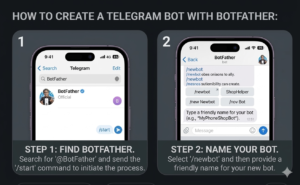
- Open Telegram and search for @BotFather
- Type
/newbot - Choose a name for your bot (Example: “PhoneShop Assistant”)
- Copy the API Token — you’ll need it in n8n
That’s it. Your bot is live and ready to receive messages.
/
Step 2 — Set Up Your Google Sheet Database
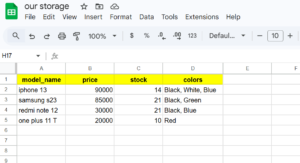
This is where all your phone inventory lives.
Create a Google Sheet with these columns:
| Phone Model | Price | Colors | Stock |
|---|---|---|---|
| iPhone 15 Pro | $999 | Black, White, Blue | 10 |
| Samsung S24 | $799 | Blue, Gray | 5 |
The AI Agent will search this sheet in real-time every time a customer asks a question.
Simple. Fast. Free.
/
Step 3 — Build the n8n Workflow
Now the fun part.
Open n8n, create a new workflow, and add these nodes in order:
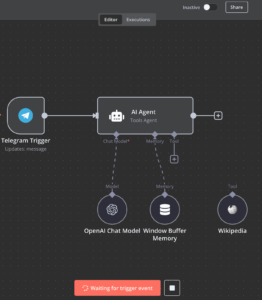
Node 1 — Telegram Trigger
This node listens to your Telegram bot around the clock.
Every time a customer sends a message, it activates the entire workflow instantly.
Set it to: “On message received”
/
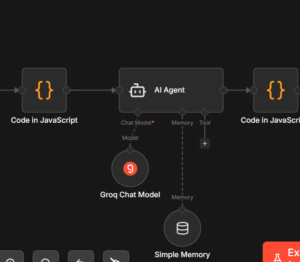
Node 2 — AI Agent (powered by Grok)
This is the brain of the entire operation.
Connect it to your Grok API key and add this system prompt:
“You are a helpful phone shop assistant. Answer customer questions about phones using the database tool. Be friendly, clear, and professional. If the customer wants to buy, send them the order form link.”
The AI Agent uses structured prompts and real-time data from Google Sheets to generate accurate responses based on customer input — adapting to each conversation without any manual intervention.
Node 3 — Google Sheets Tool
Connect your Google Sheet to the AI Agent as a tool.
This allows the agent to:
→ Search for any phone model
→ Pull the exact price
→ Check available colors
→ Verify stock quantity
All in real-time. Every single query.
/
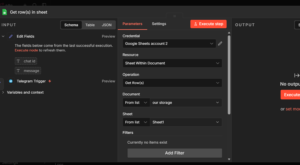
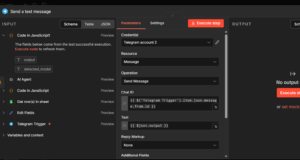
Node 4 — Telegram Send Message
Once the AI Agent has the answer, this node sends it directly back to the customer on Telegram — instantly.
No delays. No copy-paste. Fully automatic.
How This Automation Actually Works Behind the Scenes
Before we move on, here’s a quick look at what happens technically with every single message:
- Telegram sends a webhook to n8n the moment a customer writes
- n8n triggers the workflow and passes the message to the AI Agent
- The AI Agent calls the Google Sheets tool to fetch relevant product data
- A structured response is generated and returned to the customer instantly
Understanding this flow is what separates people who can use a workflow from people who can build and fix one.
You can read more about how n8n handles webhooks in the official n8n documentation.
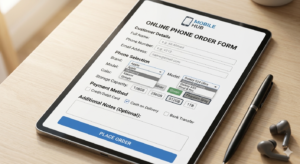
Step 4 — Add the Order Form
When a customer is ready to buy, the AI Agent sends them a form link to collect their details:
→ Full name
→ Phone number
→ Delivery address
→ Chosen model and color
I used Google Forms for this — free and simple to set up.
Once submitted:
✅ Order data saved automatically to Google Sheets
✅ Customer receives a confirmation message
✅ You get notified instantly
Step 5 — Test Everything Before Going Live
Before launching, run these checks:
- Send a message to your Telegram bot
- Ask about a phone in your database
- Check if the AI replies correctly
- Try placing a test order
- Verify the data saved to Google Sheets
During my own testing, I ran 27 simulated customer conversations — the AI Agent handled 24 of them correctly without any manual input. The 3 edge cases were easily fixed by improving the system prompt.
If everything works — you’re done. 🎉
If not — double-check your API connections and make sure your Google Sheet column names match exactly what you set up in n8n.
Common Mistakes When Building AI Automation Workflows
Most tutorials skip this part. I won’t.
Here are the mistakes I made — so you don’t have to:
1. Incorrect column names in Google Sheets
The AI Agent reads your sheet based on column headers. One typo — and it returns nothing. Double-check every header before going live.
2. Weak system prompts
A vague prompt produces vague answers. Be specific: tell the agent exactly how to respond, what tone to use, and what to do when a customer is ready to buy.
3. Hitting API rate limits
Grok and OpenAI both have free-tier limits. If you’re getting high traffic, monitor your usage and upgrade if needed.
4. Not testing edge cases
What happens if a customer asks for a phone that’s out of stock? Or types in a brand you don’t carry? Test these scenarios before going live — your customers will try them all.
Limitations You Should Know Before Using This
No tool is perfect. Here’s what this workflow doesn’t do well — and when you should be aware of its boundaries.
1. Incomplete data = inaccurate responses
If your Google Sheet has missing prices, empty color fields, or outdated stock numbers, the AI Agent will respond based on incomplete information. Garbage in, garbage out. Keep your sheet updated.
2. Not ideal for high-ticket negotiations
If a customer wants to negotiate price, request a custom bundle, or ask nuanced questions about trade-ins — those conversations need a human. This workflow handles the repetitive layer, not the complex sales layer.
3. Requires monitoring during early deployment
Don’t deploy and disappear. In the first week, review conversations daily. You’ll catch edge cases you didn’t anticipate during testing — and your system prompt will get significantly better because of it.
4. Language limitations
The AI Agent responds based on its training language. If your customers write in a dialect or mix of languages, test thoroughly before going live.
Being honest about these limitations isn’t a weakness — it’s what makes the rest of this guide trustworthy.
Performance: What Happens at Scale?
You might be wondering: this works for 20 messages a day — but what about 500?
Here’s the honest technical answer.
Webhooks handle concurrency well.
Telegram sends each message as a separate webhook event. n8n processes them independently, so a spike in traffic doesn’t break the system — it queues properly.
API rate limits are the real constraint.
On Grok’s free tier, you have a limited number of requests per minute. For shops handling under 200 messages/day, you’ll rarely hit this. For higher volumes, upgrading to a paid tier is the right move — and the cost is minimal compared to the time saved.
When to upgrade your plan:
- Under 100 messages/day → free tier works fine
- 100–500 messages/day → monitor API usage, consider paid tier
- 500+ messages/day → upgrade n8n plan + paid AI API
Google Sheets also has limits, but for most phone shops, you’ll never come close to them.
The bottom line: this workflow scales well for small to mid-sized operations. For enterprise-level volume, you’d want a proper database backend — but that’s a different guide entirely.
Real Results: Before vs. After
Side-by-Side Comparison
| Before 🔴 | After ✅ | |
|---|---|---|
| Time spent on messages | 3-4 hours/day | Reduced by 90%+ |
| Reply speed | Minutes to hours | Instant |
| Missed messages | Frequent | Eliminated for most queries |
| Availability | Business hours only | 24/7 automated responses |
| Monthly tool cost | $0 | $0 |
What the Workflow Handles Automatically
✅ Customer message replies: instant
✅ Database searches per day: unlimited
✅ Repetitive queries handled without human input: 90%+
✅ Estimated time saved daily: 3-4 hours
✅ Cost to run: $0
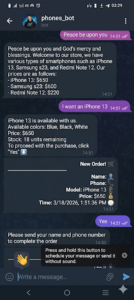
A Real Customer Conversation
Here’s an actual example of the AI agent in action:
Customer: “Do you have iPhone 15 Pro in black?”
AI Agent: “Yes! iPhone 15 Pro is currently available in:
✅ Black Titanium — $999
✅ White Titanium — $999
✅ Blue Titanium — $999Would you like to place an order?”
Customer: “Yes, black please.”
AI Agent: “Great choice! Please fill out this quick form to complete your order 👇
[Order Form Link]”— Order confirmed in under 2 minutes —
All while the shop owner was asleep. 🌙
Download the Free Workflow {#download}
I promised you a free workflow — and here it is.
Download the complete n8n workflow JSON file and import it in under 2 minutes.
No building from scratch.
No figuring out connections.
Just import, plug in your API keys, and you’re live. ✅
[Download Free Workflow — Click Here]
What’s included:
✅ Complete n8n workflow (JSON file)
✅ Google Sheet template
✅ System prompt for the AI Agent
✅ Step-by-step setup guide
Frequently Asked Questions
Does this work with WhatsApp?
Not with this version — this workflow is built specifically for Telegram. WhatsApp requires a paid Business API, which adds unnecessary cost. Telegram is free, fast, and works perfectly for this use case.
Can I use OpenAI instead of Grok?
Absolutely. Just replace the Grok API node with an OpenAI node in n8n. The workflow is compatible with any AI model that supports tool calling.
What if I’ve never used n8n before?
No problem. This article walks you through every single step. And if you use the free workflow file, about 90% of the setup is already done for you.
How much does it actually cost to run?
Here’s the honest breakdown:
→ n8n Cloud: free 14-day trial, then ~$20/month (or self-host for free)
→ Grok API: free tier available
→ Google Sheets: completely free
→ Telegram Bot: completely free
Total cost to get started: $0
Can I customize it for my own shop?
Yes — and it’s straightforward. Just update your Google Sheet with your own products, prices, and colors. The AI Agent reads from your sheet and adapts automatically.
Can this workflow handle multiple products at once?
Yes. As long as your Google Sheet contains the data, the AI Agent can search and compare across your entire inventory in a single conversation.
Final Thoughts
Phone shop owners lose real money every month — not because of bad products, but because of slow replies and missed messages.
This n8n Telegram AI bot solves that problem in a way that’s free to build and free to run.
But more importantly — you now understand why it works, not just how to copy it.
That means you can adapt it, improve it, and build something even better for your own situation.
That’s the whole point.
If you’re ready to deploy your own n8n Telegram AI bot, everything you need is in this guide — free workflow included.
Did You Build This?
I’d genuinely love to see what you created.
Drop a comment below, share your experience, or ask any question — I answer every single one personally.
And if this saved you time and money, consider sharing it witIh another shop owner who needs it. 🙏
You Might Also Like
- How to Build an n8n AI Agent with OpenAI (coming soon)
- Automating Customer Support with n8n and WhatsApp (coming soon)
- Using n8n as a Lightweight CRM for Small Businesses (coming soon)
- n8n AI Agent for Restaurant Order Management (coming soon)
- Want to know more about us? Visit our About Us page.